JPG to MD: Convert a JPG Image to Markdown
Convert JPG to MD with TO MD. See a real bank.jpg example, upload your JPG, extract readable text, rebuild tables and download clean Markdown.
 TO MD Team
Need to convert a JPG image into an editable .md file? Use TO MD's Image to Markdown converter to upload a JPG, read the visible text, rebuild useful structure, and download clean Markdown.
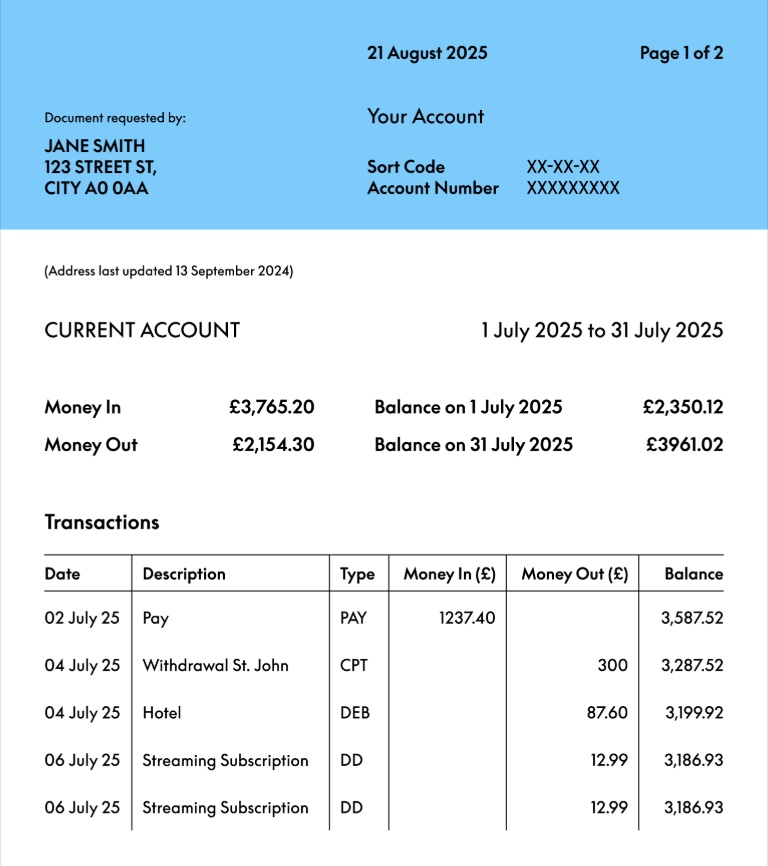
This walkthrough uses bank.jpg as an example because it has the same problems many JPG files have: small text, grouped fields, line breaks, and a table-like area that should not become one long paragraph.
What JPG to MD means
JPG to MD means converting the visible content inside a .jpg image into Markdown text. The output should be editable, searchable, and easy to paste into docs, GitHub issues, notes, or AI tools.
A good converter should do more than copy words. It should try to keep:
- headings and section labels
- short lines in the right order
- table rows and columns where possible
- spacing that makes the result easy to review
- a downloadable
.mdfile
Convert bank.jpg to Markdown
- Open Image to Markdown.
- Click Upload Image or drop
bank.jpginto the upload area. - Review the image preview so you know the file is clear enough.
- Click Convert Image.
- Check the Markdown output for table rows, line breaks, dates, and amounts.
- Copy the Markdown or download it as a
.mdfile.
If you are signed in for the first time, you can test one image conversion before buying credits. Simple Markdown tools remain free with ads; image conversion uses credits because TO MD has to read text inside the uploaded image.
Example Markdown output
For this bank.jpg example, the result should keep the top document text readable and turn the transaction area into a Markdown table:
21 August 2025 Page 1of 2\
Document requested by: Your Account\
JANE SMITH\
CITYAOOAA 123 STREET ST, Sort Code Account Number XX-XX-XX xxXXXXXXX

(Address last updated13 September224)

## CURRENT ACCOUNT

Money In GBP3,765.20 Balance on1 July 2025 GBP2,350.12\
Money Out GBP2,154.30 Balance on 31 July 2025 GBP3961.02

## Transactions

| Date | Description | Type | Money In(GBP) | Money Out (GBP) | Balance |
| --- | --- | --- | --- | --- | --- |
| 02 July 25 | Pay | PAY | 1237.40 |  | 3,587.52 |
| 04July25 | Withdrawal St. John | CPT |  | 300 | 3,287.52 |
| 04 July 25 | Hotel | DEB |  | 87.60 | 3,199.92 |
| 06 July 25 | Streaming Subscription | DD |  | 12.99 | 3,186.93 |
| 06 July 25 | Streaming Subscription | DD |  | 12.99 | 3,186.93 |
This is the practical goal: turn the JPG into a Markdown draft that is already structured enough to edit, save, or paste elsewhere.
When JPG conversion works best
JPG to Markdown works best when the image is clear and straight. For better results:
- use the original screenshot or scan instead of a compressed chat image
- avoid tilted photos when possible
- crop out large empty borders
- upload the highest-resolution version you have
- check small numbers, dates, and account-like fields manually
JPG compression can blur letters and table lines. If you have the same document as a PNG or PDF, those formats may produce cleaner text.
Common fixes after conversion
Image conversion gives you a strong draft, but the final Markdown should still be reviewed. Pay special attention to:
- wrapped table cells
- missing spaces in dates, such as
04July25 - currency symbols and decimal points
- repeated rows caused by unclear scan lines
- private details you want to redact before sharing
Why use Markdown instead of plain text?
Plain text loses structure. Markdown keeps useful formatting without becoming heavy or hard to edit. A Markdown result can preserve headings, lists and tables while staying readable in any editor.
That makes JPG to MD useful for:
- pasting document context into AI tools
- archiving screenshots as editable text
- moving table screenshots into documentation
- creating GitHub-ready notes from image files
FAQ
Can TO MD convert a JPG table into a Markdown table?
Yes, when the JPG has clear rows and columns. Complex layouts, merged cells and low contrast scans may still need manual cleanup.
Is JPG to MD the same as JPG to Markdown?
Yes. MD is the common file extension for Markdown. Both searches mean you want to convert a JPG image into editable Markdown.
Can I download the result as a .md file?
Yes. After conversion, you can copy the Markdown or download it as a .md file from the Image to Markdown workspace.