PNG to MD: Convert a PNG Image to Markdown
Convert PNG to MD with TO MD. Upload a PNG screenshot or scan, extract readable text, rebuild tables and download clean Markdown.
 TO MD Team
Need to convert a PNG screenshot or scanned page into Markdown? TO MD's Image to Markdown converter turns a PNG image into editable .md text with headings, line breaks and table structure where possible.
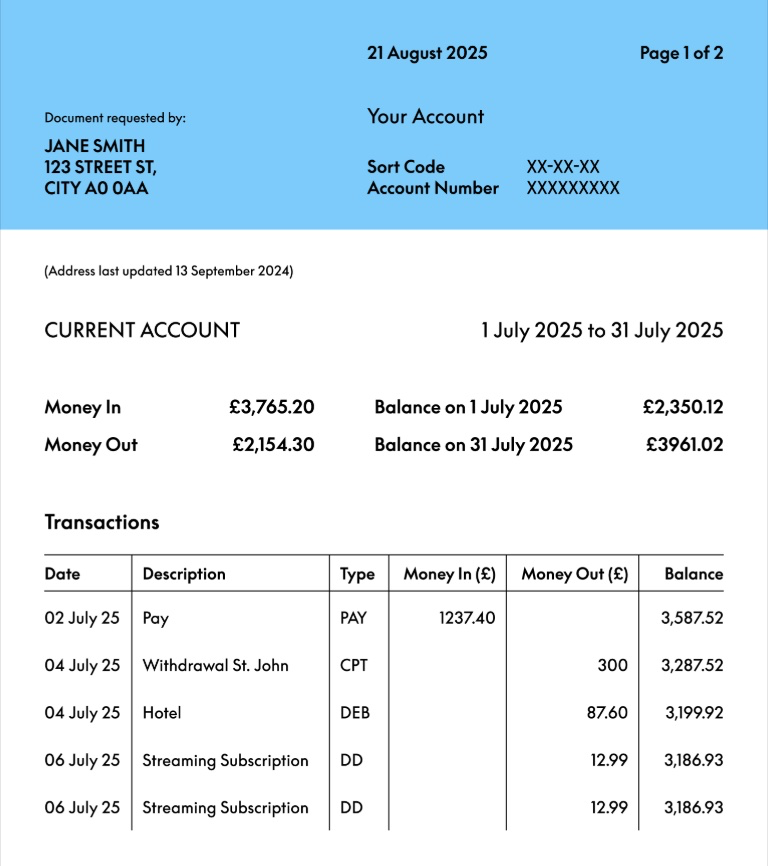
This example uses bank.png because PNG files are often used for screenshots of structured documents. The source image has header text, summary fields and rows that should become a Markdown table.
What PNG to MD means
PNG to MD means converting the visible text inside a .png image into a Markdown document. Instead of keeping the screenshot as a static image, you get text that can be edited, searched, copied, saved and reused.
PNG is often a strong input format because screenshots usually keep text edges sharp. That helps when the source contains:
- document screenshots
- receipts and invoices
- dashboard captures
- form screenshots
- tables that need to become Markdown
Convert bank.png to Markdown
- Open Image to Markdown.
- Upload
bank.pngor drag it into the image upload area. - Confirm the preview is readable.
- Click Convert Image.
- Review the Markdown output beside the image preview.
- Copy the Markdown or download the
.mdfile.
For first-time signed-in users, TO MD can provide a test image conversion. Other lightweight Markdown tools remain free with ads; image conversion uses credits because the site has to read text from the image.
Example Markdown output
For this bank.png example, a useful Markdown result keeps the document header and formats the transaction rows as a table:
21 August 2025 Page 1of 2\
Document requested by: Your Account\
JANE SMITH\
CITYAOOAA 123 STREET ST, Sort Code Account Number XX-XX-XX xxXXXXXXX

(Address last updated13 September224)

## CURRENT ACCOUNT

Money In GBP3,765.20 Balance on1 July 2025 GBP2,350.12\
Money Out GBP2,154.30 Balance on 31 July 2025 GBP3961.02

## Transactions

| Date | Description | Type | Money In(GBP) | Money Out (GBP) | Balance |
| --- | --- | --- | --- | --- | --- |
| 02 July 25 | Pay | PAY | 1237.40 |  | 3,587.52 |
| 04July25 | Withdrawal St. John | CPT |  | 300 | 3,287.52 |
| 04 July 25 | Hotel | DEB |  | 87.60 | 3,199.92 |
| 06 July 25 | Streaming Subscription | DD |  | 12.99 | 3,186.93 |
| 06 July 25 | Streaming Subscription | DD |  | 12.99 | 3,186.93 |
The result is still editable. You can fix a date, adjust a column, redact a private value, then save the final Markdown.
PNG to Markdown works best for screenshots
PNG usually performs well when the file is a crisp screenshot. You can improve the result by using:
- the original PNG instead of a resized version
- a straight image with no rotation
- high contrast text
- a crop that keeps the document content but removes empty space
- a source file where table lines and columns are visible
If a PNG was created from a blurry phone photo, the file extension will not fix the image quality. Use the clearest source you have.
Review checklist
Before you use the Markdown output, check:
- whether every row was captured
- whether the table columns are in the right order
- whether line breaks preserve the document summary
- whether numbers, dates and symbols are correct
- whether private information should be removed
This review step is especially important for financial, legal, medical or internal business documents.
PNG to MD vs PNG to Markdown
Both phrases mean the same workflow. MD is the file extension, while Markdown is the format name. People searching for png to md usually want a .md file; people searching for png to markdown usually want the same result described in full.
TO MD supports both: upload the PNG, convert visible content, review the Markdown, then copy or download the .md file.
FAQ
Can TO MD convert PNG screenshots to Markdown?
Yes. Upload a PNG screenshot to the Image to Markdown tool and TO MD will return editable Markdown text.
Can PNG tables become Markdown tables?
Yes, when rows and columns are clear. Complex tables, merged cells or low contrast screenshots may require manual cleanup.
Is PNG better than JPG for Markdown conversion?
Often yes for screenshots. PNG usually keeps text sharper than compressed JPG, but image clarity matters more than the file extension.